Connect X Ads to Baker
 Connect X Ads to Baker
- Updated
- 5 min read
- Every plan
- Who can do this: admins and members
 Open in ChatGPT
 Open in Claude
In short
Open Brain → Integrations in Baker, press Connect on the X card, sign in to X, authorise Baker and choose the ads accounts Baker may use. You need an X login with access to the ads account. Baker then reads your campaigns and results, and prepares new campaigns, promoted posts and budget changes that apply only when you publish.
By the end, your X Ads accounts are connected and Baker can read them and prepare changes for you to publish.
Before you start
- An X Ads account with a payment method.
- An X login with access to it, such as Ad manager.
- An admin or member role in Baker, or a setup link sent by someone who has one.
What does the X connection do?
Connecting X lets Baker work on your X Ads:
- Read. Campaigns, ad groups, promoted posts, audiences, targeting and results.
- Prepare changes. New campaigns and ad groups, posts to promote, targeting, budgets, bids, pausing and resuming, shown in a chat before anything happens.
- Apply them when you publish. Nothing reaches X until someone presses Publish. Then the changes are real and can spend money.
Baker does not write or post new posts on X: it promotes posts that already exist. The X Pixel on your landing pages is a separate part of the same card: see tracking tags.
Before you begin
You need:
- An X Ads account with a payment method, which X calls a funding instrument.
- An X login with access to the ads account, such as Ad manager. Baker publishes as that login.
- An admin or member role in Baker. Viewers can’t connect accounts.
If someone else holds the X access, send them this message, or send them a setup link so they can connect without a Baker login:
Hi! We use Baker to prepare and review our X ads. Could you connect our X Ads account? Sign in to X from the link, authorise Baker and tick our ads account. Baker can’t change anything until one of us reviews it and presses Publish.
Connect X
- In Baker, open Brain → Integrations and stay on the Platforms tab.
- Find the X card under Advertising.
- Next to X Ads account, press Connect. An X window opens.
- Sign in to X with the login that has access to your ads account, and authorise Baker.
- The window closes and Baker opens X Ads Accounts.
You can also connect from a chat: when Baker needs X, it shows a card that connects without leaving the conversation.
Choose the ads accounts
- In X Ads Accounts, tick each ads account Baker may use.
- Press Save changes.
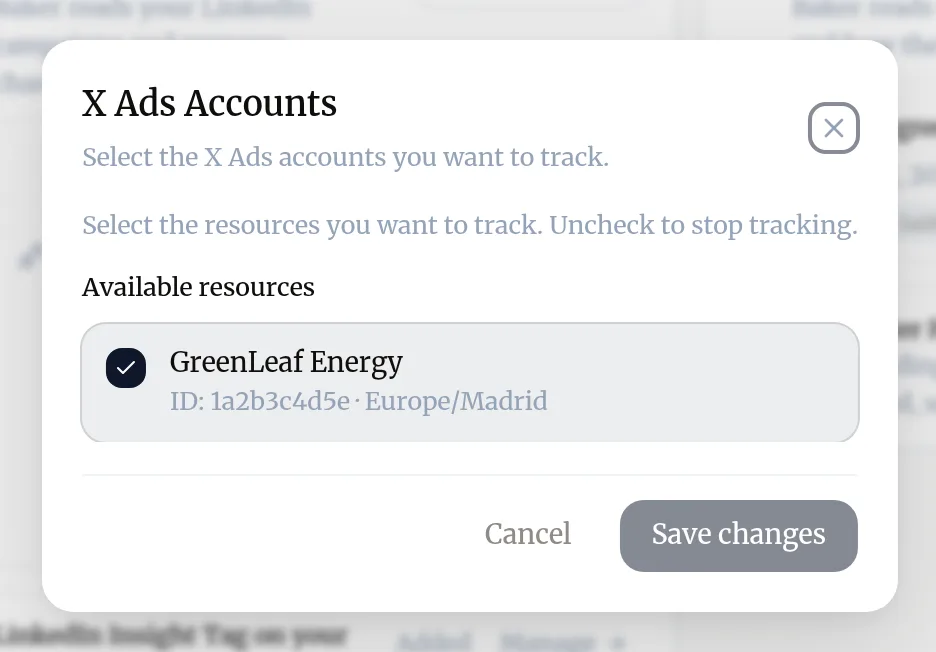
Baker reads and changes only the accounts you ticked. To change them later, press Ad Accounts on your connection in the X card.
What does Baker read and change?
X does not split its sign-in into separate permissions, so Baker can reach what your login can. Baker uses that to:
| What | Read or change | When |
|---|---|---|
| Your X handle | Read | When you connect, to show which login is connected |
| Ads accounts, funding, campaigns, ad groups, promoted posts, cards, media, audiences, targeting and results | Read | All the time, for reports and before any change |
| Your account’s posts | Read | When you ask Baker to promote one |
| Campaigns, ad groups, promoted posts, targeting, budgets and bids | Change | Only when you press Publish |
If an agency runs the account
If your agency set up partner access in Baker, your setup link shows these steps:
- Open X Ads.
- Click your profile, then Account settings, then Add user.
- Add the agency’s X account with Ad manager access, tick Can compose promotable posts and click Add contributor.
The agency then connects X in Baker with its own login.
What does success look like?
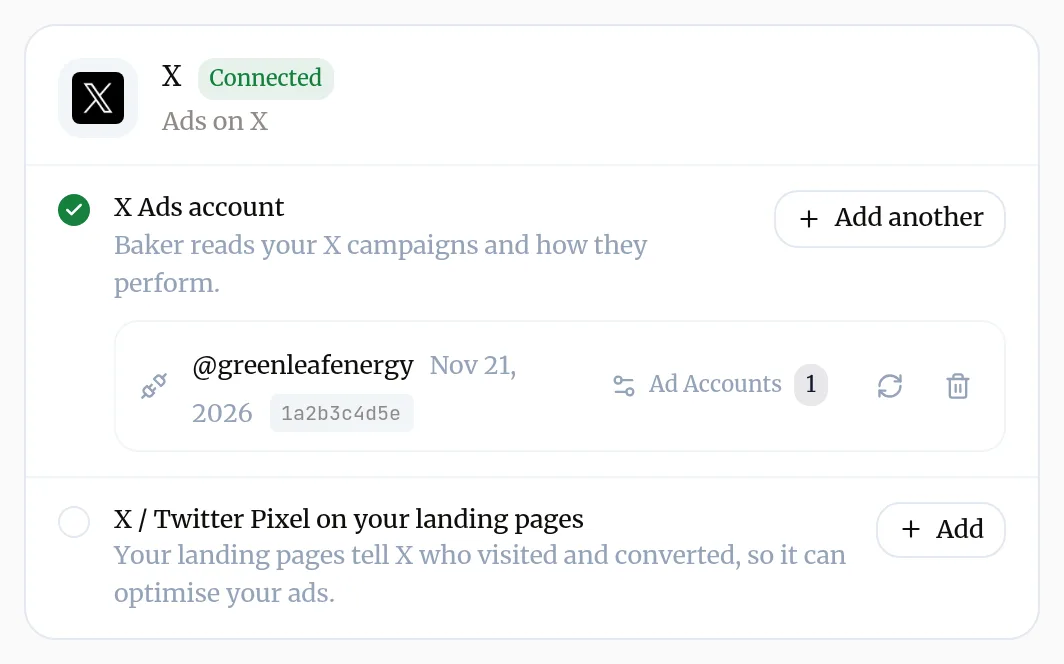
- The X card shows Connected, your handle, the ads account ID and Ad Accounts with the number you chose.
- In a chat, ask “Which X Ads accounts can you see?” and Baker lists the ones you ticked.
Use it
Ask Baker in a chat. For example:
- “Which promoted posts had the best engagement rate this month?”
- “Create a website clicks campaign in Spain with a 20 euro daily budget that promotes my last product post.”
- “Pause every campaign that spent more than 100 last week without a conversion.”
Everything Baker creates on X is paused unless you ask for it to start at once. Stopping a promoted post is final on X, so pause the ad group if you may want it back. Step by step: Launch and change ads.
Disconnect X
- Open Brain → Integrations and find your handle on the X card.
- Press the bin icon (Disconnect account).
- Confirm with Disconnect.
What happens to your data?
On X: nothing changes. Campaigns Baker published stay and keep running as they are.
In Baker: Baker deletes its sign-in, stops reading the account and stops refreshing its results. Reports, alerts and routines that rely on X stop working until you connect again.
On X’s side: Baker stays listed as a connected app on your login until you remove it in your X settings.
Get help
Write to support@withbaker.com or use the contact page. No login needed, and we reply within 24 hours.
Try asking Baker
How did my X campaigns do over the last 7 days, and which promoted posts should I pause?
What happens when you publish
The X changes you approved in the chat apply to your ads account at once, and can spend money from then on.
Troubleshooting
- If you see "The ads account you expect is not in the list when you choose accounts."
- The X login you used can't reach it. Ask whoever manages the ads account to add that login as a user, or connect with another login using Add another.
- If you see "The card says the sign-in no longer works."
- Press Reconnect and sign in to X again with the same login.
- If you see "Baker can't create a new post to promote."
- Baker promotes posts that already exist. Publish the post on X first, or as a promoted-only post in X Ads, then ask Baker to promote it.
Questions
Can a client connect X without a Baker login?
Yes. Send them a setup link. They sign in to X from it and the ads accounts connect to your company in Baker.
Does Baker see ads accounts I did not choose?
No. Baker reads and changes only the ads accounts you ticked. Change the choice at any time from Ad Accounts on the card.
Why are reports on X limited to the last 7 days in a chat?
X answers quick questions for up to 7 days at a time. For longer periods Baker uses its own copy of your results or runs a longer report, which takes a few minutes.
Is disconnecting the same as removing Baker from X?
No. Disconnecting removes the sign-in from Baker. To also remove Baker from your X login, remove it from the connected apps in your X settings.
Next steps
- Launch and change ads with Baker Ask Baker for a campaign or a change, review every change as the ad platform would show it, and publish it to Meta, Google Ads, LinkedIn, X or ChatGPT Ads.
- Reconnect an account when Baker asks Why Baker asks you to sign in to a platform again, how to reconnect from Integrations or a chat, and what a reconnect keeps.
- Ask someone else to connect an account with a setup link Send a client or colleague a setup link so they can connect the accounts they hold, with no Baker login, and give your agency partner access.
Was this helpful?
Thanks. We read every answer.