Connect Google Drive and Sheets to Baker
 Connect Google Drive and Sheets to Baker
- Updated
- 4 min read
- Every plan
- Who can do this: admins and members
 Open in ChatGPT
 Open in Claude
In short
Open Brain → Integrations, press Connect next to Google Drive account and sign in with the Google account that should hold your sheets. Then ask Baker in a chat to send a Form to a Google Sheet: pick an existing sheet or let Baker create a new one, which happens at once. Publish the Form and every answer lands as a new row. Rows already written stay in your sheet if you disconnect.
By the end, Google Drive is connected and a Form saves each answer as a row in a Google Sheet.
Before you start
- A Google account that can edit the sheets your Forms should fill.
- An admin or member role in Baker, or a setup link sent by someone who has one.
What does the Google Drive connection do?
- Form answers to a sheet. Each completed Form adds a row to the Google Sheet it sends to.
- A new sheet on request. Baker creates an empty sheet with the columns you ask for, in the connected Google account’s Drive.
- Ad lead form leads to a sheet. Leads from Meta, LinkedIn and Google Ads lead forms can be delivered to a sheet too, from when you publish.
- A deals sheet for Account insights, when your CRM is not HubSpot. Only an admin can ask Baker to create it.
Google lets Baker use only the files you pick in Google’s file picker and the files Baker creates. Baker never sees the rest of your Drive.
Before you begin
- A Google account that can edit the sheets your Forms should fill. A new sheet is created in this account’s Drive.
- An admin or member role in Baker.
If someone else holds the account, send them this message, or a setup link:
Hi! We use Baker to build our landing pages and want their leads to land in a Google Sheet. Could you connect our Google Drive? Sign in with the Google account that should hold the sheets. Baker can only use the files we pick or the sheets it creates, never the rest of the Drive.
Connect Google Drive
- In Baker, open Brain → Integrations and stay on the Platforms tab.
- Find Google Drive under Files.
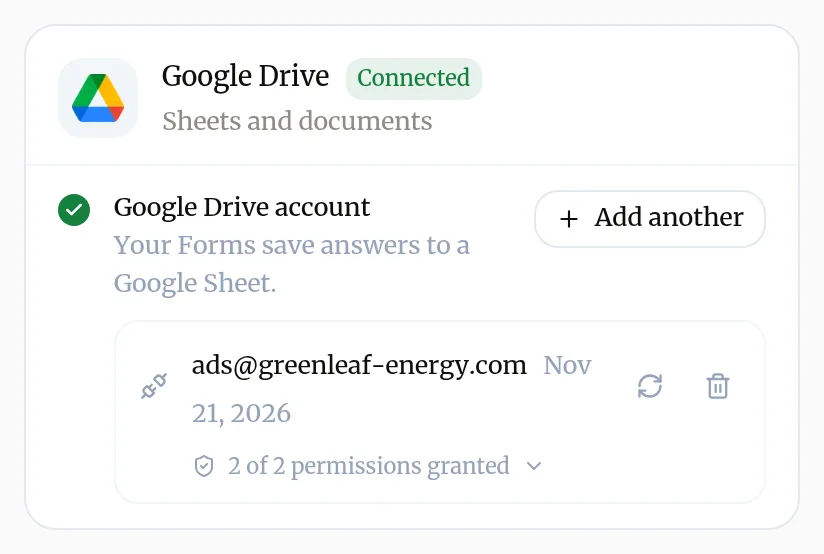
- Next to Google Drive account, press Connect. A Google window opens.
- Choose the Google account and allow the permission Google lists.
- Back in Baker, the card shows the account as connected. There is nothing to choose yet: you pick sheets when a Form needs one.
Which permission does Baker ask for?
| Permission in Baker | Google permission | What Baker uses it for |
|---|---|---|
| Use the files you choose | drive.file | Reading a sheet’s header row, adding rows, creating new sheets |
A second permission, Read the folders you connect as media sources, appears only when Baker’s team connects a Drive folder for your image and video libraries.
What does success look like?
- The Google Drive card shows your account with a green check.
- In a chat, ask Baker to send a Form to a sheet. Baker gives you the sheet’s link and the columns it will fill.
Send a Form’s answers to a sheet
- In a chat, ask Baker to send a Form to a Google Sheet. Name an existing sheet, or ask for a new one and the columns you want.
- For an existing sheet, pick it in Google’s file picker when Baker asks. For a new one, Baker creates it at once and shows it in the chat as Already applied.
- Check which answer goes to which column.
- Press Publish. From then on each completed Form adds a row.
To check it end to end, send a test lead. More about Forms: add a Form.
Disconnect Google Drive
- Make sure no Form still sends to a sheet through this account. If one does, ask Baker in a chat to change its destination and publish. Baker refuses to disconnect an account a Form still uses.
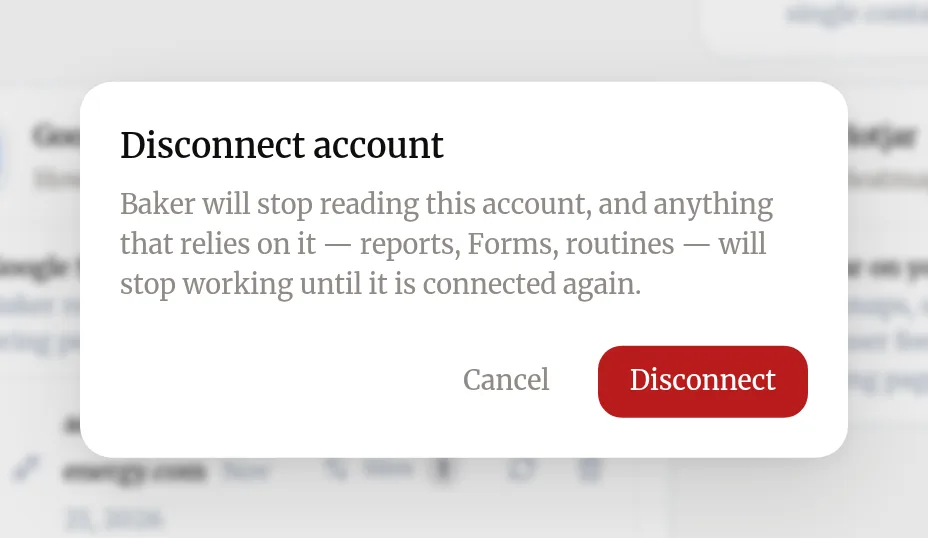
- Open Brain → Integrations, find the account on the Google Drive card and press the bin icon (Disconnect account).
- Confirm with Disconnect.
What happens to your data?
In Google Drive: your sheets and every row already written stay where they are. Sheets Baker created stay in your Drive.
In Baker: Baker deletes its sign-in to your Google account. Routines and ad lead form deliveries that write to the sheet stop until you connect it again. (Baker won’t disconnect an account a Form still sends to.)
In your Google Account: you can also remove Baker from your Google Account’s third-party connections. Baker uses one Google sign-in for all its Google connections, so that also stops any other Google connection made with the same Google account.
Get help
Write to support@withbaker.com or use the contact page. No login needed, and we reply within 24 hours.
Try asking Baker
Send every lead from my contact Form to a new Google Sheet called Website leads, with columns Name, Email and Phone.
What happens when you publish
The Form goes live and each completed answer is added as a new row. Answers sent before you publish are not added.
Troubleshooting
- If you see "Disconnecting Google Drive is refused because a Form uses it."
- Ask Baker in a chat to send that Form somewhere else, publish, then disconnect.
- If you see "Baker can't open a sheet or document you sent as a link."
- Baker only sees files chosen in Google's file picker or created by Baker. Pick the sheet when Baker asks, or let Baker create a new one.
- If you see "Rows stop arriving in the sheet."
- Check the sheet still exists and the connected Google account can still edit it. Open the Form's submissions in Landings → Forms to see what was sent, and ask Baker to repair the Form.
- If you see "A Drive folder can't be added as a media source."
- For now only Baker's team connects folders. Send a Request in Baker or write to support@withbaker.com.
Questions
Is the new sheet created before I publish?
Yes. A Form must know its sheet before it can be published, so the empty sheet is created in your Drive at once and listed in the chat as Already applied. It spends nothing and nobody else sees it. If you discard the chat, the empty sheet stays.
Does Google Sheets need its own connection?
No. The Google Drive connection covers Drive and Google Sheets.
Can several Forms write to the same sheet?
Yes. Ask Baker to send another Form to the same sheet and map its fields to the columns.
Next steps
- Add a form that sends leads to your CRM Create a Form with Baker, choose where its leads go, from HubSpot to a Google Sheet or your inbox, and put it live on your landing pages.
- Send a test lead and check it arrived Prove a Form works end to end, from your live landing page to your CRM, sheet or inbox, and read what Baker says about each submission.
- Connect an account to Baker Sign in to an ad, analytics or CRM platform from Brain → Integrations, choose which accounts Baker uses, and disconnect it when you need to.
Was this helpful?
Thanks. We read every answer.