Reconnect an account when Baker asks
- Updated
- 3 min read
- Every plan
- Who can do this: admins and members
 Open in ChatGPT
 Open in Claude
In short
Baker asks you to reconnect when a platform stopped accepting its sign-in, when a Meta sign-in is about to end, or when an older connection lacks a permission Baker now uses. Open Brain → Integrations, press Reconnect on the login's row and sign in again with the same login. Then choose the ad accounts, properties, sites or containers again and press Save changes.
By the end, the card no longer shows a warning and Baker can read, and prepare changes for, the account again.
Before you start
- You need to be an admin or a member of the company in Baker.
- Sign in with the same login that made the connection, or one with the same access on the platform.
Why does Baker ask you to reconnect?
The card on Brain → Integrations tells you what is wrong:
- Sign-in expired (or 2 need reconnecting): the platform stopped accepting Baker’s sign-in. The row reads “This sign-in no longer works, so Baker can’t read or change this account until you sign in again.” Reports, Forms and routines that use it stop until you do.
- Expires soon: a Meta sign-in ends on the date shown. Reconnect before then so Baker keeps working.
- Read-only: an older connection lets Baker read but not prepare changes. The row reads, for example, “Reconnect Google Analytics 4 to let Baker change what your Analytics property measures. Right now it can only read.”
- Limited access: the connection is missing a permission Baker now uses to read something, such as HubSpot deals or Meta lead ads after Baker’s team switches them on for your company.
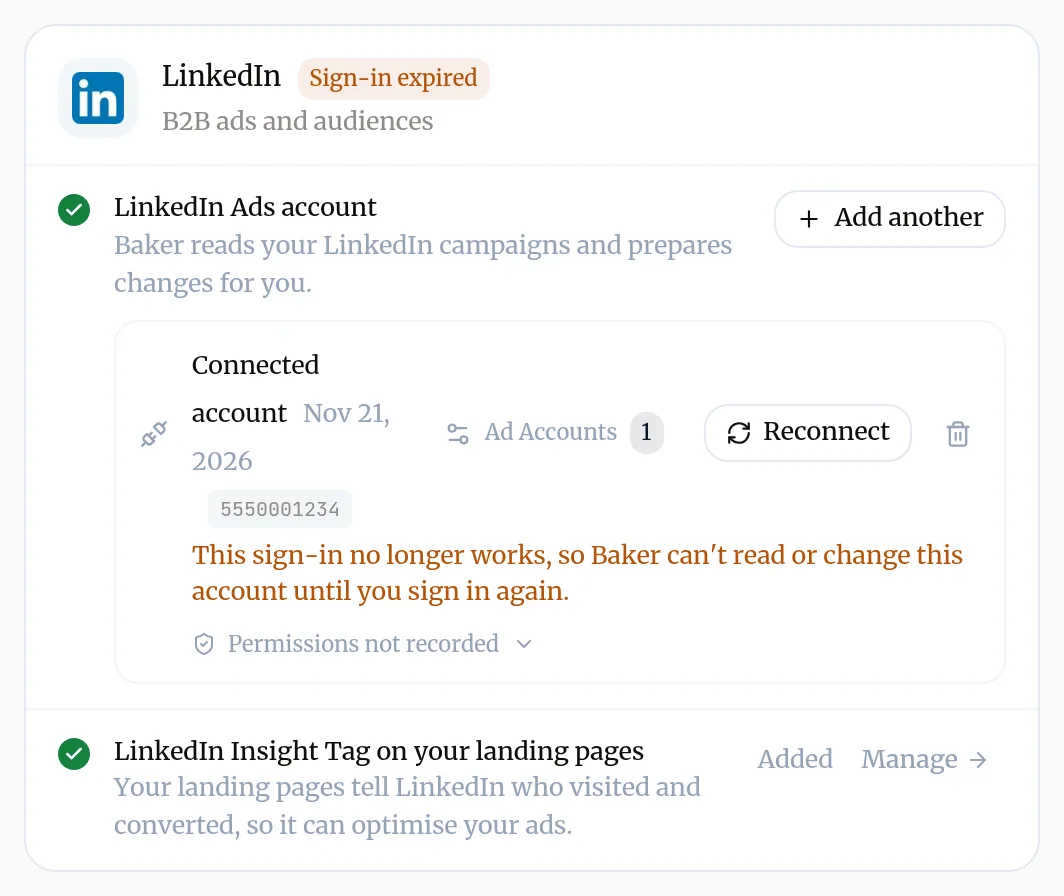
How do you reconnect?
- Open Brain → Integrations and find the card with the warning.
- On the login’s row, press Reconnect. On a row without a warning, the same action is the circular arrows icon (Reconnect to refresh permissions).
- Sign in on the platform’s window with the same login, and allow everything Baker asks. Declining a permission brings the warning back.
- If Baker shows the list of ad accounts, properties, sites or containers, choose the ones Baker should use again and press Save changes. Until you do, reports and routines that read them have nothing to read.
The warning disappears once the new sign-in has what Baker needs.
Can you reconnect from a chat?
Yes. When a chat needs a platform whose sign-in stopped working, Baker shows a card with Reconnect for it. Reconnect there, then press Continue so Baker picks the work back up.
What does a reconnect keep?
- The connection itself, with its place on the card. Forms that send leads through it carry on. Reports and routines that read an ad account, property, site or container carry on once you choose it again.
- Your changes in progress: anything a chat prepared still waits for Publish.
If you sign in with the same login through Add another instead, Baker recognises it, refreshes the existing connection and keeps the accounts you chose, rather than listing it twice.
Troubleshooting
- If you see "The warning comes back after you reconnect."
- The login may have lost access on the platform itself. Check its access there, or reconnect with a login that has it.
- If you see "Limited access stays after a reconnect."
- Some features depend on the platform account's own plan, and a reconnect can't add them. Check what the permissions line says is not granted.
- If you see "Nothing opens when you press Reconnect."
- Allow popups for Baker in your browser and press Reconnect again.
- If you see "You don't hold the login."
- Send a setup link to whoever does. They can reconnect from it with no Baker login.
Questions
Do I lose anything when I reconnect?
The connection and your changes in progress stay. Your choice of ad accounts, properties, sites or containers does not, so after you sign in, choose them again and press Save changes. Until you do, Baker reads nothing from that login.
Why does Baker say Read-only when it reads my data fine?
The connection was made before Baker could change that platform, so it only allowed reading. Reconnect to grant the permission to prepare changes. Reads keep working either way.
Why did my Meta connection expire?
Meta sign-ins last a limited time. Baker renews them when it can and warns you with Expires soon before one ends. If Meta won't renew it, sign in again.
Will Baker ask me in a chat?
Yes. If a chat needs a connection that stopped working, Baker shows a card with Reconnect for that platform, so you can fix it without leaving the chat.
Next steps
- Connect an account to Baker Sign in to an ad, analytics or CRM platform from Brain → Integrations, choose which accounts Baker uses, and disconnect it when you need to.
- Ask someone else to connect an account with a setup link Send a client or colleague a setup link so they can connect the accounts they hold, with no Baker login, and give your agency partner access.
- Find out why a change isn't live The six reasons a change you made with Baker is not on your site or ad account yet, and what to do about each.
Was this helpful?
Thanks. We read every answer.