Find out why a change isn't live
- Updated
- 3 min read
- Every plan
- Who can do this: admins, members and viewers
 Open in ChatGPT
 Open in Claude
In short
Most often the change is still in its chat, waiting for someone to press Publish: what you saw was the preview. Otherwise it is still publishing, a platform refused it, another chat holds a change to the same thing, the chat was discarded, or your pages didn't go live. Open the chat and read the pill beside its name and the publish notice; they say which one it is.
By the end, you know where your change is and how to get it live.
A change Baker made can be in one of six places. Work down this list.
Is it still waiting for Publish?
This is the most common case. Everything Baker prepares stays in its chat until someone presses Publish. The preview you saw, a page in the chat, a document you opened from it, a link a colleague shared, shows the chat’s version, not the live one.
Check:
- Open the chat from Chats. A chat waiting for you has an orange dot (Needs you).
- If the top right shows Publish with a count, nothing in it is live yet.
- Review the changes on the right and press Publish.
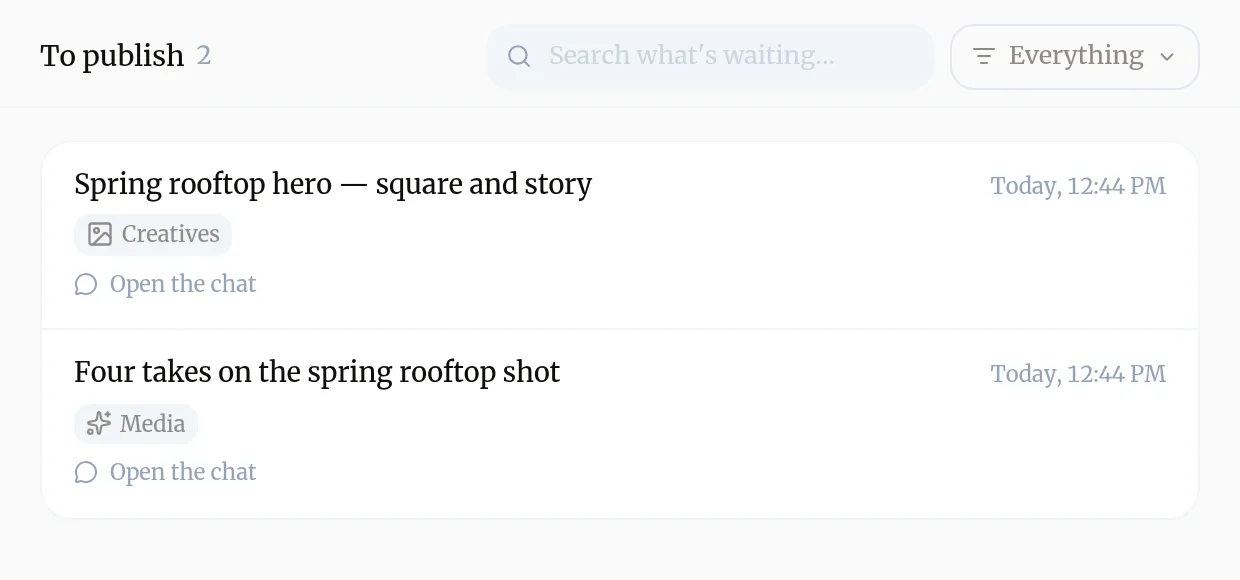
Can’t find which chat it is? To publish lists everything prepared and not yet published, from any chat, Slack thread or routine. Baker’s links in Slack and in your AI assistant open it.
Is it still publishing?
Look at the pill beside the chat’s name and the publish notice in the conversation:
- Publishing: pages show Going live, ad and tracking changes After your pages are live. Pages usually take a few minutes.
- Completed and a notice reading Published.: everything went out.
Did a platform refuse it?
If the pill reads Partly published and the notice says Published, but one change didn’t go through., your pages and the other changes are live, but a platform such as Meta or Google Ads said no to one. The notice names it. Press Fix this; see When a publish only partly finishes.
If the notice is amber and says changes are waiting their turn, the platform is busy and Baker sends them again on its own.
Did the pages fail to go live?
If the pill reads Not live yet and the notice says Published, but your pages haven’t gone live yet., your changes are saved but did not reach your site. Ad and tracking changes wait too, so no ad points at a missing page. They all go out with the next successful publish. Baker’s team is alerted; you can also open Requests in the sidebar.
Does another chat hold a change to the same thing?
Two chats can prepare changes to the same campaign, ad group or tag. Each is published on its own, and Baker warns you rather than stopping you, so decide which one you want. In To publish, a row that overlaps another shows a warning, Touches the same… with the other chat’s name; open both and publish the one you want, then discard or update the other.
Was the chat discarded?
Filter Chats by Discarded. Discarding reverts every unpublished change, and a chat nobody touches for 30 days is discarded for you. Ask Baker for the work again in a new chat; it remembers what you asked for in the discarded one.
Still stuck?
Open Requests in the sidebar to ask Baker’s team, or write to support@withbaker.com. See Contact support.
Troubleshooting
- If you see "The chat still shows "Publish" at the top right."
- Nothing in it is live yet. Review the changes and press Publish.
- If you see "The pill beside the chat's name says Publishing."
- Pages take a few minutes; ad and tracking changes follow once the pages are live. Wait for the notice to read Published.
- If you see "The pill says Partly published."
- A platform refused one or more changes. Press Fix this on the publish notice.
- If you see "The pill says Not live yet."
- Your pages haven't gone live after half an hour, or their update failed. The changes are saved and go out with the next successful publish. Tell Baker's team through Requests.
- If you see "You can't find the chat."
- Filter Chats by Discarded. A discarded chat's changes were reverted; ask Baker for the work again in a new chat.
Questions
Why does the page or PDF I opened still show the old version?
You opened the published version. The new one exists only in the chat's preview until the chat is published.
How long does a publish take?
Pages are usually live within a few minutes. Ad and tracking changes are applied right after the pages are live.
My ad change is live in Baker but not on the platform. Why?
Check the publish notice and the platform's tab in the chat. A refused change is listed there by name, and platforms can also take a while to show a change in their own screens.
Next steps
- Publish your changes What Publish sends live, in what order, how to check it worked, and how to discard a chat's changes instead.
- Fix a publish that only partly finished What it means when your pages went live but an ad or tracking change didn't, and how Fix this repairs it in the same chat.
- Find the work a chat made Where a chat's pages, creatives, reports and tasks show up in Baker, before and after you publish.
Was this helpful?
Thanks. We read every answer.