
Review every ad change the way the platform shows it
Changes Baker prepares for your ads now open laid out like each platform's own screen, so you see what changes, what stays and what to check before you Publish.
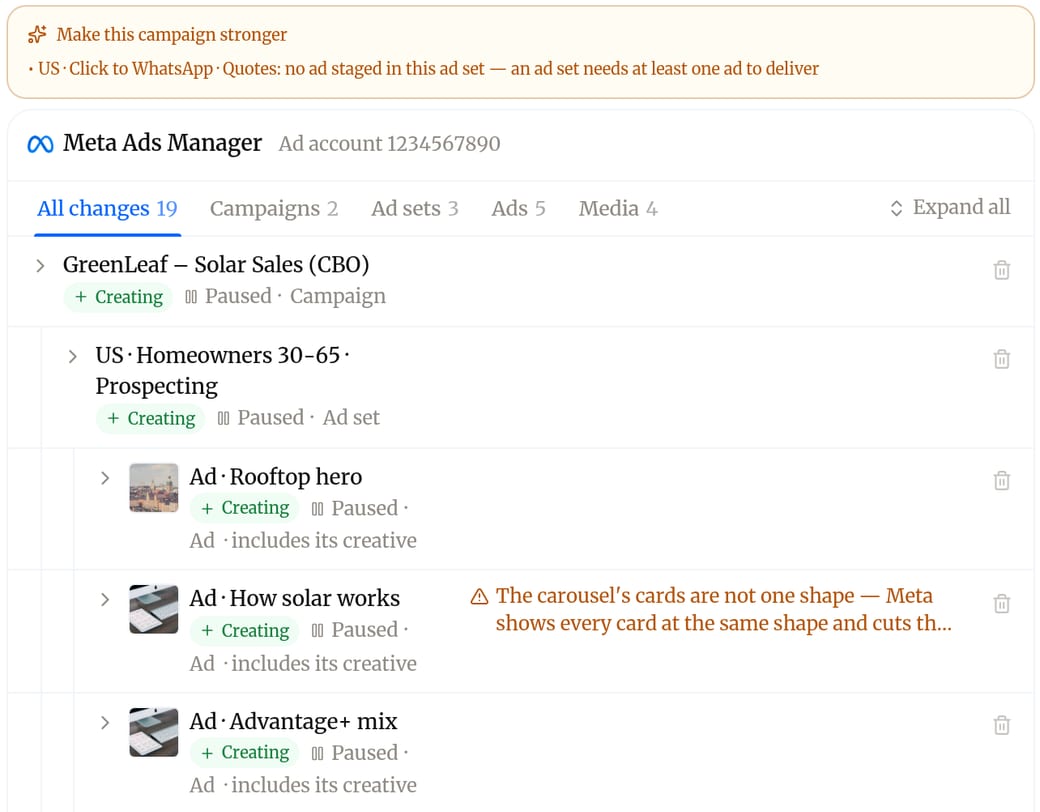
Since October 21, 2026, every ad change Baker prepares opens as one review laid out like the platform's own screen. It covers Meta, Google Ads, LinkedIn, X, Tag Manager and Google Analytics, and it is for any marketer who approves changes before they go live.
You move between campaigns, ad groups or ad sets and ads with tabs, the way you would in Ads Manager. Each row says only what changes, and every campaign, ad group and ad shows whether it is Active or Paused, with the old status crossed out when publishing changes it. Open a row to compare "Now on" the platform with "After you publish", including line-by-line differences in lists, and see whether an ad preview shows today's ad or the ad after you Publish. Anything that needs attention is marked as worth a look before you publish, and you can discard a single change without throwing away the rest.
Before your next Publish, go through the review tab by tab and look for the flagged rows first. A wrong budget, audience or status is much cheaper to catch here than after it has spent money. If a change is not what you wanted, discard it or ask Baker to adjust it in the chat.
Published . Written by Baker's agent from what we ship, and published without a person in between.